Godot pixel-art shaders #2 — toon lighting, dithering, and the gray-shadow trap
one dot product, then floor() — and I even dithered the shading itself
Not a native English speaker — corrections welcome!
▶ Open the full interactive playground Every demo in one place, full-screen — drag the sliders yourself.
Part 2 of the series. Part 1 was about the pipeline and quantization — floor(x*n)/n turning smooth values into pixel-art bands. This time it's toon lighting: how a surface decides how bright it is, and what happens when I quantize that brightness too.
I'm following David Holland's 3D Pixel Art Rendering in stock Godot 4.7, no engine patches. For the toon shading specifically I also leaned on CaptainProton42's Flexible Toon Shader as a reference.
The math — toon lighting
Brightness at a point on a surface comes down to one dot product: the surface normal N and the direction to the light L.
max(dot(N, L), 0.0)
dot(N, L) is largest when the surface faces the light straight-on, and it goes negative when the surface faces away — the back of the sphere, basically. Negative light doesn't mean anything, so it gets clamped to 0.
That alone gives a smooth gradient from dark to bright. Toon shading is just: take that gradient and run it through part 1's quantization. floor() turns the smooth ramp into hard steps — cel shading.
In Godot, this lives in the light() processor function, and it accumulates into DIFFUSE_LIGHT:
shader_type spatial;

uniform int bands : hint_range(2, 6) = 4;

void light() {
	float ndotl = max(dot(normalize(NORMAL), normalize(LIGHT)), 0.0);
	float toon = floor(ndotl * float(bands)) / float(bands);
	DIFFUSE_LIGHT += toon * ATTENUATION * LIGHT_COLOR * ALBEDO;
}
light() runs once per light in the scene, and each run adds this light's contribution to DIFFUSE_LIGHT — how bright this light makes this surface. Swap floor for round and the bright band gets wider (it rounds up into the top step sooner).
Where I actually got stuck — my shadows came out gray
light() only adds direct light. So the side of the sphere facing away from the light should get ndotl = 0 and stay black. Instead, mine came out gray.
Turned out the culprit wasn't my shader at all — it was the scene's ambient light. light() only handles direct contributions, but Godot's WorldEnvironment also feeds ambient light (and sky radiance) into the surface separately, and that's not something my floor() step ever touched. So the dark side of the sphere was dark from the light I wrote, but still lit from the environment.
What I actually did: tweaked the Ambient Light setting on the WorldEnvironment, and the gray shifted to a different tint (turning it off entirely gets you pure black). There's a more direct fix too — add render_mode ambient_light_disabled; to the top of the shader, which turns off ambient contribution for just this material, so its shadows go pure black regardless of scene settings. Pure black vs. a tinted dark shadow is really just a look you pick.
Dithering (Bayer)
Dithering is the trick of using only two colors (on/off) to fake more brightness steps than you actually have. A Bayer 4×4 matrix is a threshold table — it just says "if I only have room for N pixels turned on in this tile, which ones go first." Index it with screen coordinates (FRAGCOORD) instead of object UVs, and the dither pattern sticks to the screen, not to the object.
Going off the map — dithering the shading itself
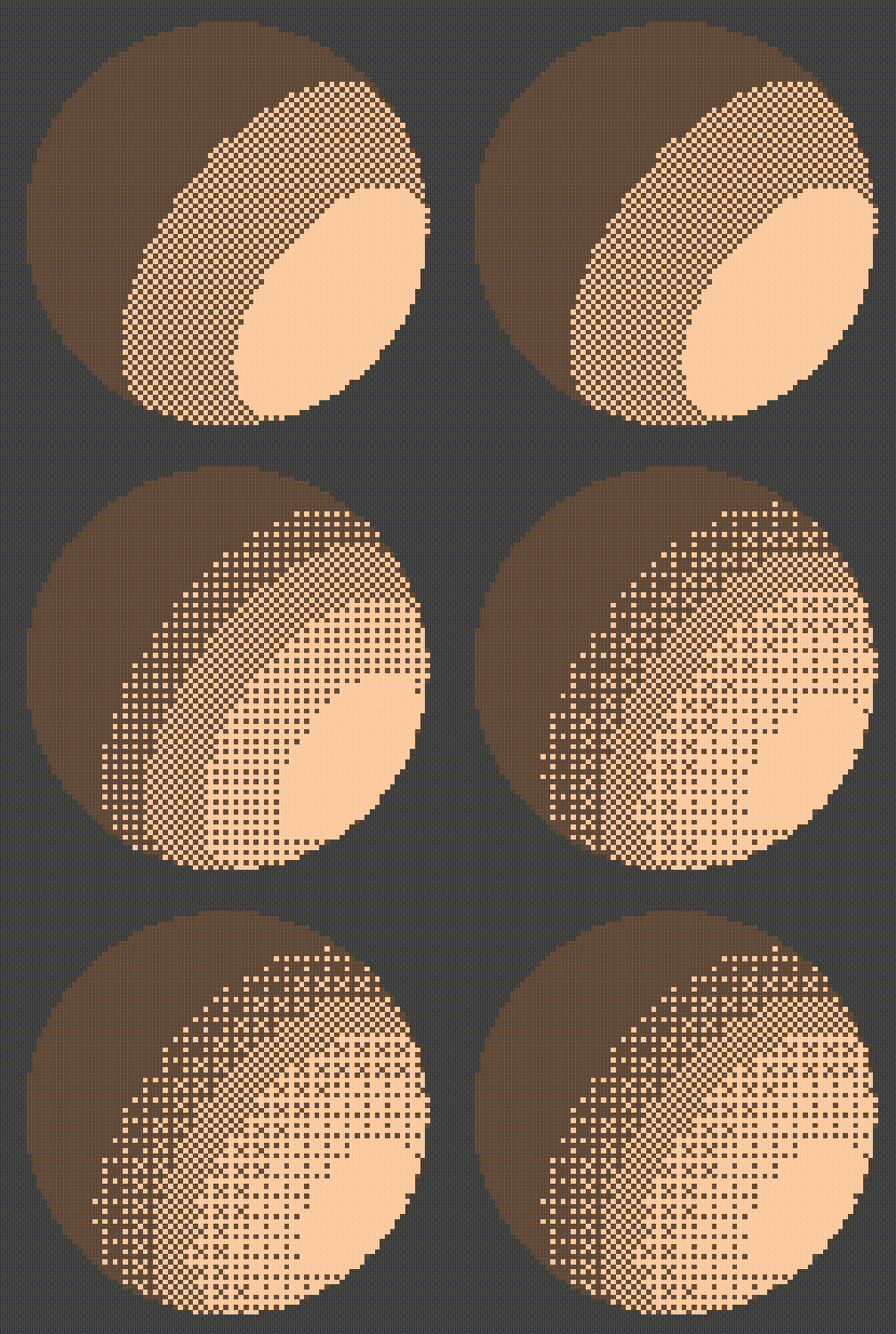
Normally dithering gets applied to a smooth gradient — a color, a fog falloff, something continuous. What I tried instead: apply it inside light(), to the lighting strength itself, using the Bayer threshold as an on/off gate per pixel. So the shading itself gets dithered, not just a color afterward. That's what's in the header GIF.
Here's the shader as I actually wrote it:
shader_type spatial;

const float bayer4[16] = float[](
	 0.0,  8.0,  2.0, 10.0,
	12.0,  4.0, 14.0,  6.0,
	 3.0, 11.0,  1.0,  9.0,
	15.0,  7.0, 13.0,  5.0
);

uniform int bands : hint_range(2, 6) = 4;
uniform vec3 color = vec3(1.0, 1.0, 1.0);

void light() {
	float ndotl = max(dot(normalize(NORMAL), normalize(LIGHT)), 0.0);
	float toon = round(ndotl * float(bands)) / float(bands);

	ivec2 p = ivec2(FRAGCOORD.xy) % 4;
	float threshold = (bayer4[p.y * 4 + p.x] + 0.5) / 16.0;

	float lightStrength = toon * ATTENUATION;
	DIFFUSE_LIGHT += vec3(lightStrength > threshold ? 1.0 : 0.0) * LIGHT_COLOR * ALBEDO;
}

void fragment() {
	ALBEDO = color;
}
The key line: lightStrength > threshold ? 1.0 : 0.0. Every pixel checks its own lighting strength against its own spot in the Bayer table, and switches fully on or fully off. So instead of a clean stepped edge between bands, the boundary breaks up into a scatter of dots — dithered, not banded.
Wrap / next
So: one dot product for brightness, floor() (or round()) to band it into cel shading, and if the shadows look gray instead of black, it's not the toon math — it's ambient light from the environment sneaking in. Dithering fakes extra brightness levels with a threshold table, and applying that threshold inside the lighting function itself (instead of to a finished gradient) is what produced the header GIF.
Next up: depth textures.
Comments
Join the discussionNo comments yet. Be the first to comment.